Dans cet article de la KB, nous vous montrons comment trouver le menu déroulant Action et les paramètres (menu Plus) pour tous les outils Mailfence.
Remarque importante : le menu d’action et les paramètres généraux sont tous deux marqués de 3 points, mais ils n’offrent pas les mêmes options. Vous trouverez toujours les paramètres ou le menu Plus en cliquant avec le bouton droit de la souris sur le composant auquel vous souhaitez accéder.
FAQ sur les réglages et le menu Action
The settings menu gives you options such as Delete, Create a new folder, rename and Move
Whereas the action menu will allow you to take certain actions such as mark, import, archive, and others which you can see below. You can see the difference below.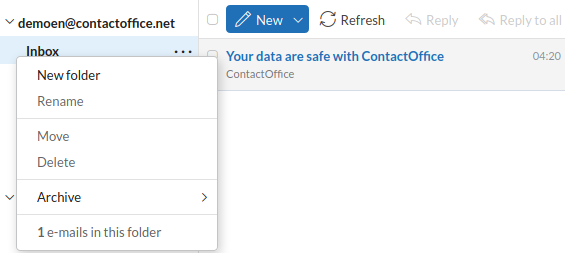
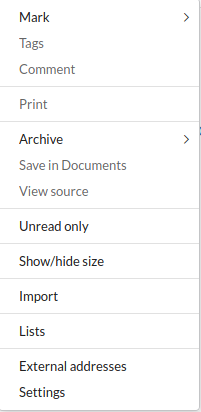
To find the Action Menu for the Mail
Go to your Mail = > On the top bar you will find options such as New, Refresh, Reply. At the end of the bar, you will find 3 DOTS. These 3 DOTS represent your overall settings for the Mail.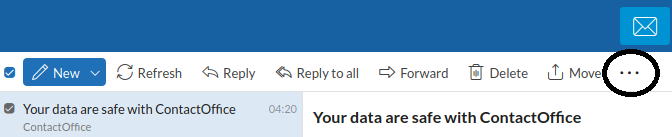
Go to the Documents tab = > On the top bar you will find options such as New, Refresh, Download. At the end of the bar, you will find 3 DOTS. These 3 DOTS represent your overall settings for the Documents.
Go to the Calendar component = > On the top bar you will find options such as New, Refresh, Download. At the end of the bar, you will find 3 DOTS. These 3 DOTS represent your overall settings for the Calendar.
Go to the Contacts component = > On the top bar you will find options such as New, Refresh, Edit. At the end of the bar, you will find 3 DOTS. These 3 DOTS represent your overall settings for the Contacts.
Go to your Mail = > On your left side you will see your Inbox at the end of it there are 3 dots, this option represents the dropdown menu. You can either click the 3 dots or you can right-click your Inbox to get the drop-down menu.
Go to your Documents= > On your left side you will see your My documents option at the end of it there are 3 dots, this option represents the dropdown menu. You can either click the 3 dots or you can right-click My documents to get the drop-down menu.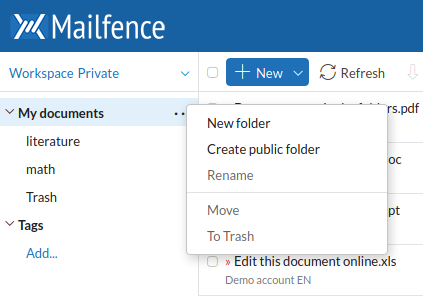
Go to your Calendar = > On your left side you will see your Calendars at the end of each calendar there are 3 Dots, this option represents the action menu. You can either click the 3 dots or you can right-click a calendar to get the drop-down menu.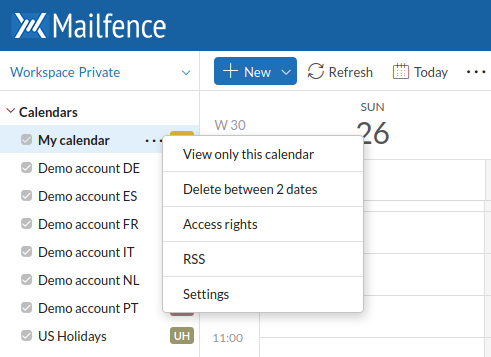
Go to your Contacts = > On your left side you will see your contacts. You can only right-click to get the action menu in the case of Contacts, there are no 3 Dots. Moreover, you cannot right-click the My contacts, instead, you need to right-click on the contact you would to either edit, delete, etc..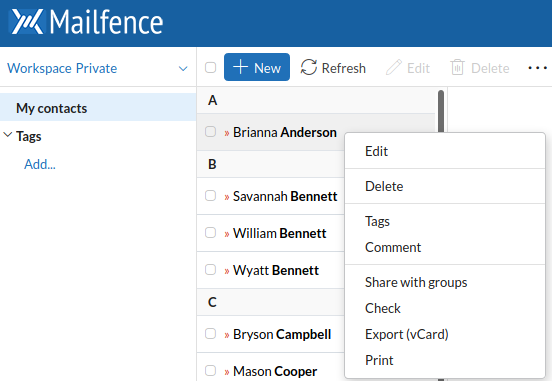
Si vous rencontrez des difficultés avec le menu d’action et les paramètres, envoyez-nous un petit courriel à support@mailfence.com(clé PGP) afin que nous puissions vous aider.